Game Guide

How to Play Stack Tower

Everything you need to know about the controls, scoring, and mechanics of Stack Tower.

1

Open the Game

Go to the Play page. The game canvas loads immediately in your browser. No installation or account is required.

2

Start the Game

Click the Start Game button, tap the canvas, or press Space. The first block begins moving across the screen.

3

Watch the Moving Block

A coloured block slides back and forth above the tower. Watch its position relative to the block below it.

4

Tap or Click to Drop

Tap the canvas, click with your mouse, or press Space / Enter / Arrow Down to drop the block at the current position.

5

Only the Overlap Stays

The portion of the dropped block that overlaps with the block below lands on the tower. The overhanging portion falls away, trimming the block width.

6

Game Over

The game ends when a block misses the tower completely — when there is no overlap at all. Your final score is shown on screen.
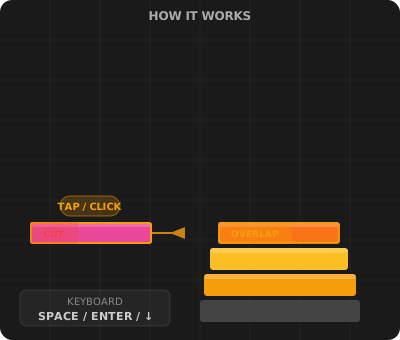
Stack Tower controls diagram

Input Methods

Device Input Action
DesktopSpace barDrop the current block
DesktopEnter keyDrop the current block
DesktopArrow DownDrop the current block
DesktopMouse click on canvasDrop the current block
Mobile / TabletTap the canvasDrop the current block
AnyStart Game buttonBegin or restart the game

How Points Are Calculated

Drop Type Points Effect on Block Width
Normal drop (partial overlap)Based on overlap widthBlock is trimmed to overlap area
Perfect drop (exact alignment)+15 points baseBlock width stays the same
Perfect combo (consecutive Perfects)+15 + (combo × 5) bonusBlock width stays the same
Miss (no overlap)0 — game endsGame over
Tip: Aim for consecutive Perfect drops to build a combo multiplier. The bonus points from a combo chain add up quickly.

Ready to Play?

Open the game and start stacking. Your high score is saved automatically.

Play Stack Tower